Wednesday, 15 July 2020

Minisforum Deskmini DMAF5 MiniPC on Indiegogo: Will it be the return of the AMD Brix Idea?

Just a couple months ago, Minisforum started to talk abit about releasing an AMD based APU MiniPC that could potentially rethink and refresh the idea of a MINI PC.

A few years ago, such tiny PCs were a thing, and to some degree, it still is today. But what the architecture of CPUs were back then were running too hot and running too slow. As demonstrated and reviewed in my Gigabyte BRIX back then, the AMD A8-5557M was hot, slow, and noisy. Not exactly what you want in an APU and even a small block PC.

http://paulstechinsights.blogspot.com/2015/04/review-of-gigabyte-brix-a8-5557-r9.html

Fast forward 5 years on since April 2015. I still think Small PCs have their place and can excel given the right environment and architecture. Today I have backed what would have been a worthy successor to the Gigabyte BRIX which I still have after reviewing that. It's by a company called MinisForum and their campaign on Indiegogo just went live a day or two ago.


And for everyone's info, I initially thought of myself more into gaming PCs. But lately not so, I'm a sucker for mini PCs. I have an Alienware Alpha, the aforementioned BRIX that is now upstairs in my brother's flat above mine, a Mini Chuwi Minibook. All good SFF machines. But I'd like to be sure that this one is a good one after I get mine from the campaign.
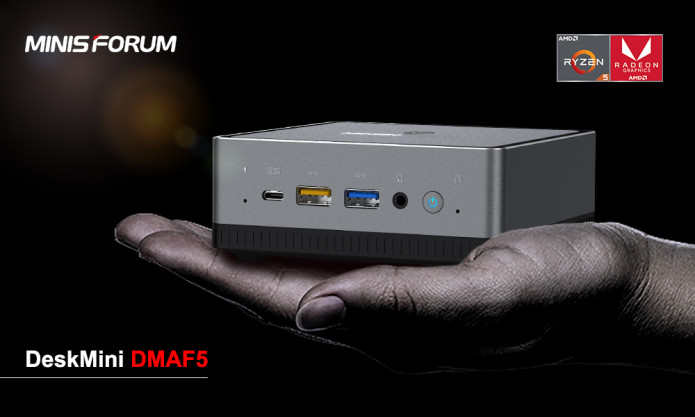


Now I know that Ryzen has already come out on smaller form factor PCs like the AsRock Desk mini A300 STX. However, this is the first time a company is putting that into a Brick Form Factor that's barely the size of your hand, maybe even smaller. And given how successful and how well Ryzen has aged over the last 2-3 years, now's the time to give this Super SFF idea a try again.

FEATURES
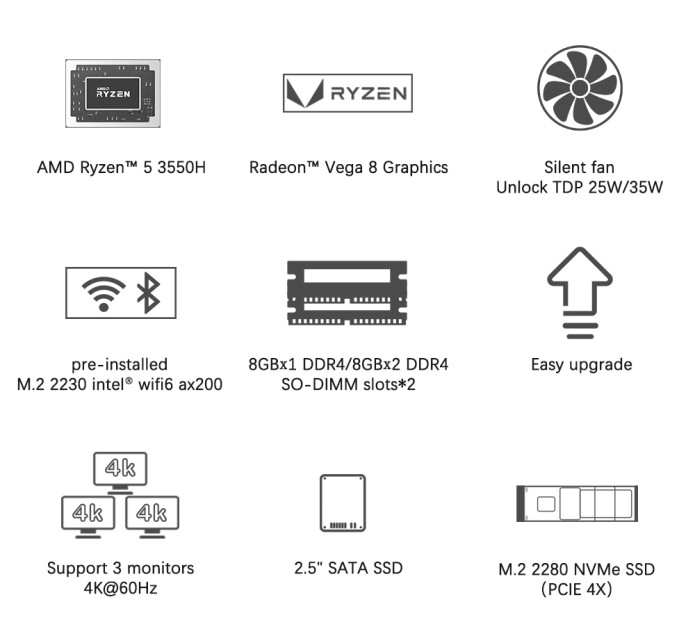

Specs
AMD Ryzen 5 3550H (4C8T)
2 SODIMM DDR4 RAM slots (starts at 1x8GB 2400 DDR4 Module, supports up to 2x16GB)
M.2 2280 nVMe SSD (Starts at 256GB)
2.5" SATA Bay (1TB HDD at stretch goal)
AMD Vega 8 Graphics (512 Stream Processing Units)
WiFi 6 Standard (Intel AX200)

Cutting short to the chase here, The tiny PC, codenamed the Deskmini DMAF5, is meant to be still upgradable, and easily serviced too. In a video with Linus Tech Tips, it just opens up with 2 press tabs to reveal the innards just by pushing the top of the device. It already starts off with a base 8GB RAM, and an M2 SSD. However you can still expand it even further with a 2.5" drive that can be installed in its bay as well as a 2nd SODIMM Slot for further increasing its RAM. On Indiegogo you can also top up the extra to have the 1st SODIMM slot taken by a 16GB RAM module instead, so it can go up to 32GB which is more than plenty for an office PC or HTPC. However it is a slower RAM kit at 2400MHz and being AMD, higher RAM speeds will affect user experience on AMD more than Intel does. I'm hoping that MinisForum will up RAM speeds to 2666 or 2800 MHz because this will also help graphics performance for the VEGA 8

The cream of the crop is the Quad Core SMT Ryzen APU / SoC. The 3550H. I know that the 4000 series is already in the market and wished that they update the models as such but the 3550H is still by no means a slouch of a Quad Core. And the fact that it does come with Ryzen VEGA 8 integrated Graphics means that it has some muscle for graphically intensive tasks. The 512 Stream Processing units on it should perform about as well as the intel's Iris 655 counterparts.

With that all said, the DMAF5 is said to be as comparable if not better than Intel's NUC offerings for a significantly cheaper price as shown in the comparison table below even if the dimensions are ever so slightly bigger. But being AMD, Thunderbolt 3 is absent which is a shame.
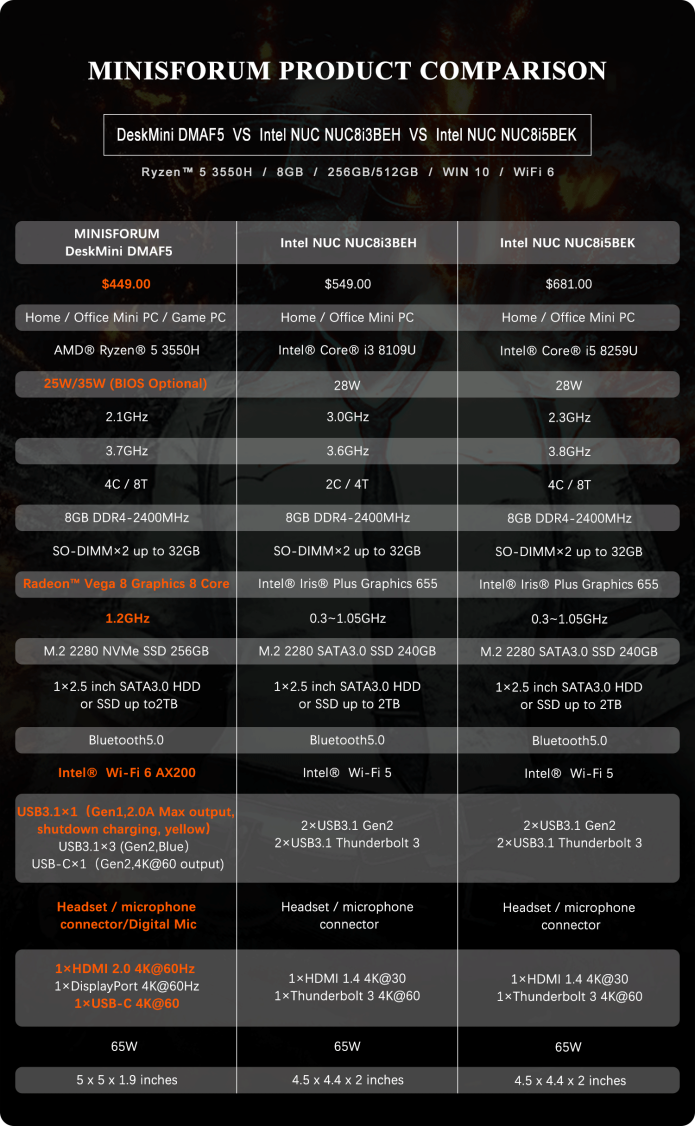

However your WiFi does get the WiFi 6 standard which increases efficiency over crowded areas. That's one of the features the competition, the NUC don't have. And also, thanks to overwhelming support, the SSD which was originally configured for SATA is now being tested for an NVMe upgrade. I don't usually fuss about SSDs being super speedy, but rather to ensure a snappy OS at the very least. But it'll be nVMe by the time this rolls out.

PRICE:

At time of this writing, the Super Early Bird of 399 USD is already gone, leaving the 429USD version in the Early Bird Pack. It's not exactly cheap but you're paying for that space saving feature. Lucky I was among the first 20 to back the Super Early Bird Perk which is pretty much the sweet spot for the PC. Initially the first 1500 Contributor IDs will receive an additional micro keyboard free. Not exactly the most usable add on but for a HTPC and a mini keyboard makes sense. This has been changed however thanks to a stretch goal, to a 1TB 2.5" HDD which is great. And the nVMe speed bump being testing is welcome at this price point.


COMPETITORS:

As far as competition goes, as of 21st August 2020, another of such device has appeared on the market. Beelink has entered the competition with a similar device with the same CPU.


Bottomline is you have an AMD equivalent of a NUC but slightly bigger, no thunderbolt but quite a fair bit cheaper with WIFI 6, nVMe. It can also be expanded and upgraded to some extent with more RAM and an extra 2.5" drive which is now a stretch goal already achieved. However as of this update on the 16th August 2020, you can also top up 40 USD for another 8GB of DDR4 RAM which I did and is actually quite reasonable and you don't need to fuss with RAM upgrades anymore. I know people with 16 can also up to 32 but I'm not sure as to how  much users will need to top up. It remains to be seen how well it will perform, which I will be testing for once it arrives in October. Also aforementioned with the hard drive, which means I don't need to tinker with the machine right out of the box!

I was regretting of not getting the Chuwi HiGame as it is more powerful in the gaming department. But the mini will to do.

TESTS ONCE IT HAS ARRIVED:

Gonna be a while till it does but my plan is to pit this against my Gigabyte P27G v2 Laptop that has been my bedside daily driver that recently has some plaguing issues especially when it comes to hibernating or turning off the hard drives. But also competing against some old scores that I have with the Gigabyte BRIX.

The laptop has the following Specs:
Core i7 4810MQ 4C8T
16GB DDR3 RAM
GTX 860M

Where the Gigabyte Brix has
AMD A8 5557M
6GB DDR3 RAM
Radeon R9 M275X / Radeon Mobility 8890M

Because my main idea of this miniPC is to see whether it can directly replace my Laptop and see how much better it is over the Gigabyte BRIX. Because CPU spec-wise they have the same number of cores but the BRIX's one doesn't have SMT and the architecture is way off compared to the Ryzen. The 5557M is based off of the Richland architecture, actually a derivative of Bulldozer which was quite bad. And now with Ryzen we'll see how it stacks up against my 4810MQ. Should be very similar! 
But we'll see!

Monday, 15 June 2020

GAME REVIEW: Command and Conquer Remastered Edition - Remaster Done right, But please give MacOS Native Support for this game!!!

This comes as a 25-year Silver Jubilee anniversary for the Command and Conquer series. And it is a remaster rather than a remake of the first two games in the series, Tiberium Dawn and Red Alert 1 including all of their expansions. It's released on STEAM and EA Origins on 6th June 2020. It was developed by former employees of the original Westwood Studios who now formed Petroglyph Games, the same developer company that made Forged Battalions, another RTS Game that was decent.


Tiberium Dawn: New construction options: Global Defense Initiative. I keep forgetting the
Conyard looks so tiny compared to the refinery in TD!
Now I've started first with Red Alert then the expansions of Counterstrike and Aftermath. Later on, I only played the Sega Saturn version of Tiberium Dawn on one of my cousin's interface then later Red Alert Retaliation which is a PS1 port of the Counterstrike expansion. Both similar interfaces. But PC versions are the way to go here.

OVERVIEW OF CHANGES

With that said the remaster does bring about a massive update / overhaul to the game's interface, graphics and music with the aim of keeping the gameplay of the game the same as the original as much as possible. 


Red Alert 1: Defending mountain passes with the Allies! My favorite faction. This was the mission
that appeared on the CD Manual of the original Red Alert. This is from the Chuwi Minibook m3-8100Y.
This will be taken over by the Chuwi UBook Pro with the same specs.
Massive details like guns, turrets, and other stuff in each unit has been tweaked. For a full comparison, I've linked a video by Starfals comparing old vs the new units of Red Alert 1. He's doing all the comparisons at this moment. Alot of the graphical detail that was missed in the original was enhanced, like adding machine gun cupola on the APC, guy at the back with the machine gun on the ranger jeep. The works.

https://www.youtube.com/watch?v=JHUtYgJqaFE

The other noticeable changes brought to the game was the sidebar. Featuring the Red Alert 2 and C&C3 Tiberium Wars style build tab, separated to buildings, infantry, vehicles (which includes aircraft and naval vessels), as well as super-weapons / powerups. As well as the power meter. It also shares the 3 column icons instead of 2, from C&C3 and OpenRA.

But what they could have done is when a Power Plant or Construction yard is selected the power consumption is displayed, like it did in Tiberium Sun and Red Alert 2. Also the game is designed to run now at 60 fps no matter on the game speed, which makes it way more fluid and smooth and less stiff.

Also what is brought in is build queues. And you can have up to 99 same/different units in the queue at a time. Harvesters and Ore Trucks will automatically harvest ore the moment it comes out of their war / weapons factory provided you have a refinery.


A huge welcome addition that was not in the original is the ability to completely rebind your keys from the keyboard settings of the main menu. You don't need to use the defaulted hot keys preset from the game. You can tweak it to any key you like for faster commands. There's an extensive guide from Bryan Vahey as to get your key bindings going, as well as some basics to help you get used to hotkeys. If you're someone who likes messing with hotkeys, this is the best guide to use.

https://www.youtube.com/watch?v=5sLB-Hf8Oe4


The Ability to completely rebind your keys is huge.
Credits: Bryan Vahey's C&C Remaster Basic Tips


SOUND FX AND MUSIC:

Sound effects have also been updated to use a newer engine thanks to the advantage of Hi-Definition audio. They sound decent, but not too great. However, there is a little tweak that you can do if you want the nostalgia factor. Head to the settings and turn the old sounds of the classic game back on. That's usually what I would prefer to play along with the High Def Graphics enabled.

The music is remastered and rearranged by the original composer, the legendary Frank Klepecki who did the original soundtracks for both Red Alert and Tiberium Dawn. What I'll say is simply turn up your subs and enjoy it. And if you'd like to relive nostalgia, again from the settings, you can play the old music.


PERFORMANCE:

Comments based on the game are pretty mixed by most people. But I didn't seem to come across much performance issues on mine. Only thing I have at times is sometimes a noticeable drop in frame rates when there are too many health bars on screen, especially when the setting of health bars always on is selected.

But other than that it is a very light title to run. Here's my test device:

Core m3-8100Y

16GB DDR3L RAM
Intel UHD 615 Graphics

And now the requirements below.


Light requirements in 2020, I mean REALLY light. Which makes the game easy to run on most PCs.

With requirements like a Core 2 Duo, pretty much any potato or office Basic PC can run this game. Heck, I have no problems running it with a Core m3-8100Y from a Chuwi MiniBook with an Intel UHD graphics 615. It's worse than iGPUs that have Intel HD 520, 620, and Iris 5100. So if my little minibook can run this game just fine, and at 1920 x 1200 (Although borders limit playable to 1920 x 1080p), don't worry about your old PC if you'd want to run this game. You need about 32 Gigs of storage space which may sound a lot for a light title, but at least it's a far cry from like 120GB games that really irk me off. I strongly believe games should never exceed 75GB in space and really expect all developers to stick to it.


I'd say a GTX 750Ti even for an old budget GPU, is considered overkill. Like real overkill when I tried it on my GTX 860M Laptop based on this GPU, 100+ or more FPS is no problem with that. Kinda says alot of the lightness of the game.

BONUSES: Galleries

As you continue to play the game, you'll unlock some more hidden treasures and behind the scenes picture galleries, what goes on during development. I think it's a nice touch for a way to showcase the rich history of Command and Conquer and how it really became a catalyst of then an all new genre of Computer games, Real Time Strategy. It's worth taking a look as a bit of a breather in between missions and game time. 

THE GOOD: Almost everything, even touchscreen support for small micro missions is nice.

So far I've been playing this on my Chuwi Minibook with a core m3-8100Y and what it brought to the table was touchscreen support. Although you can simply use the mouse and keyboard method as it was in the classic, this was how close I can achieve a mobile experience on the game. Loved the interface, the music and how light the requirements are.


Here's an example of me playing on touchscreen, the first mission of Tiberium Dawn.

Some people do report Sidebar graphical issues which I've seen on STEAM forums but so far on my minibook, no problems. That said it's one problem that needs addressing.


THE BAD: Mainly OS Support, abit crash heavy on Multiplayer

Out of the box, some improvements are definitely needed out of the box in terms of Quality of Life improvements and game balancing. Some people complain of the very slow growth rate of tiberium and ore. I know I can easily address this with the Rules INI file, which is always something I like to mess with, but it should be adjustable in game especially for multiplayer where the universal values isn't exactly the best. Hard difficulty is reported to be REAL hard that it's broken. But usually I go to the max of Medium.

No MacOS Support which is FUCKING BULLSHIT!!!

Multiplayer is a bit flaky as well. With me and my friend RocketAbyss facing constant crashes till we quickly join launch games before it has the chance to crash out. Not perfect but fixable.

The biggest deal breaker for me is the lack of MacOS and Linux native support. Because despite the amount of computers I have, my daily driver is STILL my 2014 13.3" MacBook Pro running on High Sierra. And I've quite a lot of friends from school who still use MacOS that want to play this game without going the route of a Virtual Machine and Boot Camp JUST for this one game. That's a reason why I gave the STEAM review a thumbs down.


And I also don't see why Windows 7 is also supported. Some people who run Windows 7 on it reported it runs fine however. And believe me, Windows 7 is still my favorite windows based OS even though I largely have switched to Windows 10 on most of my platforms.


BOTTOMLINE: Still have tweaks to iron out. But at least it's a remaster done right.

There's still some issues to sort out since the release of the game, like stuttering issues, some UI issues, and complaints over AI pathfinding and slow growth of ore / tiberium. These are the little issues that we've come to expect over launch day and pre-patch. But still the biggest factor is lack of OS support.

However with all that brought to the table for a decent 20 USD, which is fair considering you have 2 games with you, at least it's a remaster, mostly done right. Great graphics, decent sounds and awesome music with the option of using legacy ones along with light requirements, make it a good game to install on office notebooks or Windows Tablets and just play abit on the move.


But Please, for God's sake get MacOS / Linux Support on this damn thing!!!!

Friday, 29 November 2019

New HTPC / Potential Main Gaming PC: Ryzen Five is Nice!

ROLE OF THIS PC:

The role of this PC that it will take over my Gigabyte P27Gv2 as the beside rig and letting this PC take the reins. It'll hide at the corner crevice below the Projector so I can use the HDMI port with the Vankyo Leisure 510 Projector or the Taihe Gemini 15" Screen.


COMPONENTS:
Ryzen 5 1600 with Wraith Max Cooler
16GB Corsair Vengeance LPX 3000MHz Memory
Coolermaster Elite 120
720GB SSD, 2Tb Toshiba 
AsRock A320I Motherboard
nVidia GeForce GTX 1070 (Zotac Mini Version)
Silverstone SFX 600W PSU
CPU: Ryzen 5 1600.

The first Ryzen 6-cores are still great for most tasks and it was cheap when I bought it. It did come with a Wraith Cooler which is actually big for a stock cooler which saves on cost a bit. For a 6 core, it was and is still the better value proposition than then 1600X.

Chassis: Coolermaster Elite 120

This is an old case, but I still like the look of these cause' till now they still look pretty sleek for what they are. In fact I still prefer this case over the newer 130. This came from the guts of my brother's rig that had a Pentium G3258 overclocked to 4.5 GHz. Still love the case, with the Small Desktop oblong chassis ideal as a HTPC or SFF ITX gaming build like this. I'll still be using the Optical Bay. But bad thing is it is just a bit too short as an ATX power supply mount barely clears and just touches the Wraith Stealth Cooler. But it's still short enough for me to use as a bedside HTPC and I can plop my Gemini on it. And the height is way more suitable than the Dell Precision T3500.

Power Supply mount just barely
clears the Wraith Stealth Cooler

GPU: Zotac nVidia GeForce GTX 1070 MINI


The Zotac GTX 1070 in its new home with the 3GB GTX 1060 as backup
This one, oh man, what a roller coaster ride. I intended to use an R9 290 that is handed from a friend and at the time was one of my most powerful GPUs I had in hand. This belonged to Dr Matt, and I gave the GPU a good dust down a couple years ago and applied Thermal Grizzly's Kryonaut. Initially it was working over the first couple weeks till I get random blank screens which signals overheating of the card which was weird. I currently have a GTX 1060 3GB as a placeholder but I intended to get an even better GPU anyway, so I found this for just over 200 SGD, 160 USD which is a nice upgrade over the R9 290. I may repaste it with Arctic Silver MX5 but let's see the temperatures first.

In comparison with the R9 290 and the GTX 1060 (Mine), GTX 1070 Max Q and my Zotac Mini and some notebookcheck scores. Just for giggles I also decided to include an old score with my GTX 970s in SLI, Overclocked with an OC i7 2600K at 4.7 GHz.

Score:
R9 290: 9808, 10799 OC
GTX 1060: 11134
1070 MaxQ: 12058
GTX 970 SLI: 14558, 16582 OC
GTX1070: 14764 Mine, 15906 OC

GPU Score:
R9 290: 11079, 12399 OC
3G GTX 1060: 11965, 12837 OC
GTX 1070Q 14869
Mini 1070: 17171,18906 OC
GTX 970 SLI: 20818, 24116 OC

The scores are interesting in a way that my GTX 1070 paired with a R5 1600 when overclocked has a better overall score than stock 970 SLI at its very worst stock scores and the GPU is not far away from it either. The old 970 SLI with a 2600K rose a lot when I overclocked both but that still suggests a bit of a CPU bottleneck.

Back to current tests though, my mini GTX 1070 is:

Stock:
- 54% better than a stock R9 290, 38% than a R9 290 OC
- 43% better than a stock 3GB 1060, 33.7% better than a 3GB GTX 1060 OC
- 15% better than a GTX 1070 Max Q

Overclocked:
- 70.6% better than a stock 290, 52% than a 290 OC
- 58% better than a stock 3GB 1060  47.2% better than an OC 3GB GTX 1060
- 27.1% better than a GTX 1070 Max Q

Having said that the R9 290 can trade blows with a 3GB 1060 given the right circumstances, but still can get outclassed.

PSU: Silverstone GX-600 SFX PSU (80+ Gold)

The PSU may be a little dated at this point, but it's still a good enough power supply to use. It may be notorious for having a bit of a ripple problem but nonetheless it was considered the best 600W SFX units in the market and has proven that efficiency can be almost consistently be 90% rather than 80% at optimal loads as reviewed by JohnnyGuru and AnandTech in 2014/2015. So it's kinda close to Platinium / Titanium Standard than Gold. I got this new from Shopee for 130 SGD, about 100 USD which is good for an SFX Form Factor PSU, especially when other units cost 40-60% more of that same wattage like the Corsair SF Series and the newer generation of Silverstone SFX PSUs. That form factor benefits the already cramped nature of the case and gives the extra inch for at least everything to breathe.

The PSU can be secured to the top of the mount
But best to be used with the bracket.
But with the cables stuffed in there, it was difficult to make room for some open area around the Ryzen 5 1600 to get that airflow it needs.

16GB 2x8GB Corsair Vengeance LPX 3000MHz 

Now I am abit sketchy for this one, but I'm praying for the best because of some mixed reviews on the units arriving either DOA or as chunks of plywood inside the package. But if it's the true thing, then the Corsair Vengeance should be okay as far as quality goes. I still have Corsair Vengeance 1600MHz DDR3 RAM running on my Dell Precision T3500 with modules dating as far back to my gaming rig. But we'll see. The motherboard can only take 2933 MHz but it's not far from the advertised 3000MHz and it's still plenty to run it. Got it at 100 SGD and it works.

720GB COLORFUL SSD

The SSD was bought new from EBay for 93 SGD, 68 USD. 720GB is absolutely plenty for an SSD and the speed is not really an deal breaker for me. Hence I'm okay with a SATA 3 based SSD than an M.2 one as my boot drive. And I rather have a good amount of space on an SSD for as little money as possible and keeping to 2.5" Drives makes it a bit cleaner and less bulky in weight. I do have a 256GB M.2 2242 SSD but that will be for the miniBook which is on its way. 

MASS STORAGE: 2TB TOSHIBA P300 Drive

As much as Hard disks are less relevant these days and SSDs can be found 

How the setup will be like?
The TaiHe Gemini makes a nice Low Power Bedside monitor while saving on Power Cables. And 15.6" is just right to plop it on the chassis next to the bed. 


POTENTIAL UPGRADES

The only 2 pieces of upgrades that I may potentially see in the future, is a replacement board to a B350 one that has integrated WiFi on it. The other component is an R7 1700X that may be also be possible if that can be secured at a good price. But these components can wait as soon as they come down in price and I'll only do it if I can sell my GTX 970 SLI and my PIQO Projector.


Sunday, 7 July 2019

CHUWI MiniBook: Preview - Tiny but mighty giant? Quickly Crowdfunded, arriving in September 2019 ETA.

OVERVIEW


Chuwi has always been an interesting company, stressing value for money technology. There's only one device that I have was manufactured by them, the Chuwi Hi9, a pretty decent tablet great for watching movies and stuff on the go.


Now do note, the Chuwi Minibook is still in crowdfunding development so it won't be ready until at least September of 2019. At the same time, Chuwi also released the Lapbook, a 4K 15" thin ultrabook powered with an Apollo-Lake Atom X7-E3950 (1.6-2GHz) with Intel 505 Graphics. But let's face it, the minibook that I'm getting has significantly more grunt and muscle and I can bring this portable windows 10 power even in the smallest of my bags that I've got. That's what the Minibook is aimed for, to have productivity that can be carried around anywhere with adequately powerful enough hardware to do the tasks required like in an office environment. Cause' face it, it's sized between my Samsung A8 Star Smartphone, and my 10.1" Samsung Galaxy 2014 and Chuwi Hi9 tablets, making it the smallest machine that I have that supports windows.


Chuwi Minibook compared to the size of a magazine! Quite a difference there.
Source: Indiegogo


First thoughts of the project

Now I've a confession to make. I was actually very close in backing the Topjoy Falcon Convertible (Pentium N5000), another project that has a near identical chassis compared to the Chuwi Minibook. In that case, even though it was like almost last year when the project was conceived, the goods from Topjoy have yet to ship to backers yet but someone has did a review on it already last year.
https://www.cnx-software.com/2018/10/15/topjoy-falcon-review-mini-laptop-windows-10-ubuntu/

The Topjoy Falcon! See the similarity to the Minibook??!
Source CNX
But because I can trust the brand Chuwi from the decent Hi9 Air Tablet I own, I went for them instead. That said, the functionality and objective remains the same as with the two mini convertibles and I believe this is the yoga tablet to get over the Lapbook and the Topjoy Falcon Convertible. And since I was back and forth and getting a mini convertible for so long now is the best chance I've got to go all out and get one for my travels.

689,921 SGD on 14 July 2019
733,207 SGD on 23 July 2019
?? on 28 July 2019.


MINIBOOK SPECS
Spec sheet of the Minibook
Source: Indiegogo

SoC: Core m3-8100Y

This efficient SoC is based on the 14nm Amber Lake Architecture, closer to Kaby Lake than it is Apollo or Gemini-Lake based Atoms and Celerons. It is a dual-core CPU with Hyperthreading and a 1.1 GHz base clock, with a max turbo of 3.4 GHz which is pretty respectable. The Minibook is also offered with the Celeron N4100 which has more cores. However, some would argue that having a much better single-threaded performance is much more optimised than more cores. And the m3 having a much better IPC than the Celeron makes for a far superior SoC in many ways. Performance wise the m3-8100Y should be around some of the generation of dual core i3s and older dual core i5s. 

CHUWI advertises the m3-8100Y having a great single threaded performance. Let's see whether my sample would hold true. If you look at the images that follow, the Celeron's very low base clock speeds might be a problem even if you have more cores. But depending on the user, sometimes the N4100 would serve well enough.

Cinebench, often the best tool for benching CPU Single and Multithreaded performance
Source: CHUWI
Higher Clocks, big benefits. Even dual Core can outperform a Quad Core in Multi Core performance
even though the N4100 has 4 cores. Source: CHUWI

8GB Base RAM, Upgradable to 16GB: Originally when the crowdfunding page came up, the Minibook was to be shipped with 8GB RAM. But now after public outcry, users can double the RAM. Early backers can get their RAM Upgrades for $10, then later 20 then 30. I happen to get it for $10 so that was a cheap add-on and well worth it. Though 8GB is fine and the kinda standard for office use, having double RAM means a lot more resources can be allocated for more memory hungry tasks. It’s a shame the m3 version doesn’t support DDR4 compared to the Celeron configuration, but it is still at least dual channel so there’s enough memory bandwidth and more RAM can be allocated for the HD Graphics 615.


Intel UHD 615 Graphics:
As far as the graphics go, the updated Amber Lake Intel Graphics is a step up from the older 605. It has a base frequency of 300 MHz and a turboboost of 900 Mhz with 24 Execution Units (EUs). It may not run some of the newer titles, but for older games like Diablo III, Torchlight 1, Path of Exile, Terraria and even CS:GO will be a perfect fit for this integrated chip. And because of the relatively small screen, I feel that some games can be gotten away with playing at low 720p or even 480p with a bit of Anti Aliasing. 

See the notebookcheck’s page for the UHD 615.
UHD 615
https://www.notebookcheck.net/Intel-UHD-Graphics-615-GPU.317064.0.html

For the N4100 option, the less powerful Intel UHD 600 is considerably weaker, having a lower base frequency of 200 Mhz and topping at 700 and EUs halved at 12. And if you see the above image at the CPU section, the UHD 600 power is roughly just under half that in Open GL section at 25.01 vs 12.22 fps.


GPU Scores from the Passmark Benchmark Table.


As far as the resolution goes, the UHD 615 is capable of outputting all the way to 4K 60Hz, making multimedia and high res movies a possibility to output to an external high res screen. 


But in General, the GPU should perform around the same as like a Radeon HD 8760D or a GT 640M LE. Other notable GPUs that are down the list that you can't see are:

- GeForce 920M, Score 736
- Intel HD 4600, Score 712
- Radeon R5 240, Score 647

Display: An IPS 1920 x 1200 at a 16:10 ratio is a good resolution for a small 8" Tablet. At 283 PPI, that is actually more than enough of a pixel density to give a good picture. The great thing about the display is that it can be operated in a yoga fashion. Either as a traditional lappie or completely folded to a tablet mode. Having touchscreen is also a very nice get for this purpose.

STORAGE:


128GB eMMC: 128GB is not exactly a lot. Moreover Windows 10 which will come with it has been absolutely a resource hogger lately that 128GB is not really an option. I’m hoping, like really hoping for Chuwi to expand it to 256GB eMMC as part of our stretch goal to have just enough wiggle room. The Minibook is advertised to be able to fit an M.2 nVMe Drive. And as at 23rd July 2019, perks have arrived to add a 512GB SSD to the unit for the m3 which I did snag and the 256GB for the N4100 which is great. But if you want it, you may want to grab it quick as stocks are limited!!

I still feel it's better to have a 256GB eMMC base first as one this is the drives of the competition is not user-upgradable. The M.2 drive, my biggest guess is that it’ll be a 2242 form factor. Do note, mSATA drives cannot fit and therefore can’t be used as the key is different compared to M.2. I have to clear that up first just in case people ask what drives you can put in there. There’s also another mini SD Card slot for additional secondary storage which is great for transferring files off like my Phone for example. 
eMMC is never as fast as SSDs but if you're only based on office work and stuff this shouldn't
be an issue. Source: CHUWI

If you take a look at the score, SSDs will of course trump it, but the eMMC read and write speeds are enough for normal office files. I'm not so hard up on read speeds as long as it boots windows snappily without the agonizingly sluggish crawl of a traditional Hard Drive. But having a room for an extra drive is nice.


Battery Life:The Chuwi Minibook's 26 Wh battery may not sound like much. But since the m3 8100's TDP is only rated at 4.5 watts, this could be sufficient for day to day use. It is advertised to last around 8-9 hours. Personally I'd like a slightly bigger battery but I doubt anything bigger than that could be fitted in there.

Port Selection: Ports are actually very nice for a laptop this small. 2 USB Type A + 1 Type C for both PD and charging is perfect. What would be great is that the Type C only supports standard USB 3.1 Gen 1, not thunderbolt. 

INTEL, please for the love of God give Thunderbolt 3 Support like by means of a firmware or a BIOS update! If this should compete with the MacBook Pro / Air, you would want a Thunderbolt port. The M7 processors in there do support Thunderbolt, there's no reason not to do it for the m3-8100Y! But at least the minibook has a microSD Card slot which is great to supplement the storage. From the discussion in the Indiegogo page, it can support 128GB at most. This one I have, so let's see whether it can support anything higher.

Ports Aplenty. Source: Indiegogo


3.5mm headphone jack, I'm looking at you Apple MacBook!!! This still has the Headphone jack which I am so not ready to let go yet.

MINIBOOK'S COMPETITION:

As far as competing products go, there are a few that fall in the same use case scenario.

- Topjoy Falcon
- GPD P2 Max (Below Photo)

GPD P2 Max, similar hardware and form factor without the YOGA
Source: Indiegogo for GPD P2 Max
And each one has their pros and cons. Ultimately, the Minibook has mostly the best tradeoffs for the most optimal performance.


As aforementioned, the Minibook uses a similar chassis as the Falcon, but with more beefy specs. The GPD P2 Max, has a higher res screen and comes with SSD preinstalled which I am hoping that the MiniBook can add for the Super Early Bird Perk. But the minibook is Cheaper, can do Yoga which the P2 can't, and the 1920x1200 screen is still more than enough compared to 2560 x 1600p and it is a good trade for lower pricing. Also the biggest advantage is that the Minibook can readily accept a Micro SD card thanks to an integrated micro SD card slot which the others would require an external dock for it, like the Keychron T10 Dock I also bought.

And also as a sidenote the Falcon no longer uses the Pentium N5000 anymore since the Pentium N5000 ran out of stock real quick. However they received the Pentium J5005 which has a nice performance bump almost like a Core 2 Quad. And for the 2nd generation of the Topjoy Falcon Convertible, they too will get a SoC Bump  to the m3 8100Y. And since all the miniPCs would eventually top out at this SoC, the competition is determined on who will sell at the best pricing with the best features, so it's now up to Chuwi to see what they can do to better the odds in their favor.


In any case: If you want to explore these links with regards to the competition's SOC and their general performance, here are the links to their NBC Page and their CPUBenchmarks. These benches are not by me but at least they'll give a rough idea on how they can perform against on a universal benchmark.

Pentium Silver N5000: https://www.notebookcheck.net/Intel-Pentium-Silver-N5000-SoC.271794.0.html

CPU for all competitions.
Intel Core m3 8100Y, Score 3562: https://www.cpubenchmark.net/cpu.php?cpu=Intel+Core+m3-8100Y+%40+1.10GHz&id=3367


Entry Level CPU for the Topjoy

Pentium Silver N5000, Score 2436: https://www.cpubenchmark.net/cpu.php?cpu=Intel+Pentium+Silver+N5000+%40+1.10GHz&id=3204
Pentium Silver J5005, Score 2910 : https://www.cpubenchmark.net/cpu.php?cpu=Intel+Pentium+Silver+J5005+%40+1.50GHz&id=3144

Entry Level CPU for the P2 Max
Intel Celeron 3965Y, Score 1629: 
https://www.cpubenchmark.net/cpu.php?cpu=Intel+Celeron+3965Y+%40+1.50GHz&id=3234

Entry Level CPU for Minibook

Intel Celeron N4100, Score 2276: https://www.cpubenchmark.net/cpu.php?cpu=Intel+Celeron+N4100+%40+1.10GHz&id=3270


Tapping out to the m3 8100Y is a good move as the m3 8100Y's closest resemblance to a proper mainstream CPU is obvious, despite the Falcon's CPU upgraded J5005 which also did produce the 2nd best score across the board which on first glance looks quite impressive. The Celerons are left lying in the dust with the P2 Max's 3965Y model pulling up the rear being just half as powerful as even the Silver J5005, let alone the Core m3.

As far as GPU's concerned, the UHD 615 will just trump the other integrated GPUs of the other SoCs: UHD 600 vs 605 vs 615.

https://www.videocardbenchmark.net/compare/Intel-UHD-600-vs-Intel-UHD-605-vs-Intel-UHD-615/3876vs3861vs4006

But storage from Chuwi's Minibook as a base is really lacking. The entire competition except us is starting the base as 256GB of SSD Storage while we have to make do with eMMC. Worst still, and again please note that our storage compared to the competition is not user-upgradable so that needs to be maxed out before it rolls off the production line. So this is the KEY area of improvement.

Bottomline: Huge potential, up to Chuwi to unleash it.

Tweaks to the backing:
- eMMC starting at 256GB instead of 128GB
- Thunderbolt 3

This device certainly has a lot of potential if Chuwi can listen to their backers and squeeze to the absolute limit because of what it can offer in a small package. What would be absolutely awesome is a slot for a Micro SIM, eMMC storage just starting right off at 256GB as a base we always wanted, instead of 128GB, or have a 256GB SSD add on to the eMMC without many of us who backed the SUPER EARLY BIRD perk having to cancel and reorder the config at a way higher price which is total utter garbage. To me, doubling that eMMC storage would actually be the best thing you could give to the MiniBook, not really the 8GB of RAM especially since everybody else starts their SSD at 256GB while ours is not even SSD, just an unupgradable eMMC flash like SD card space which is slower which is a huge deal breaker if not improved.

Trust me, many of us are willing to pay abit of extra for it. Hell I wouldn't mind the delays if that is required. Face it, with apps and Windows an absolute hogger these days, 128GB is no longer viable.


And Intel, please give Thunderbolt 3 support for the m3! That would the perfect icing on the cake! 

When it does arrive at my door eventually, Chuwi, I'll definitely play with it, and I can actually leave my MacBook Pro permanently at home.


Saturday, 2 February 2019

Bargain find: 900 USD Laptop Sager NP8952 / Clevo P950HR with GTX 1070 Max-Q

Man, have I gotten a steal of a lifetime, a 1200SGD Lappie 900 USD including shipping...

As far as that goes the only problem with this thing is the keyboard is not fully functioning. But that is usually not a problem as I intend to stick an external keyboard for home use anyway as a direct replacement for the Dell Precision T3500, removing most bottlenecks and platform limitations found on the old X58 Architecture.

SPECS:
CLEVO P950HR - Nomenclature SAGER NP8952R
CPU: Core i7 7700HQ
RAM: 16GB DDR4 2400MHZ RAM, CAS Latency timings 17-17-17-39
GPU: nVidia GeForce GTX 1070 with Max-Q Design, 1101 - 1229 MHz Core, 8GHz 8GB GDDR5.
Display: 1920 x 1080p 15.6" 16:9 60Hz.
Drives: 250GB Samsung 960 EVO nVMe Drive, 2.5" empty bay.
Power: Battery - 60Wh, AC Adapter 180W
OS: Windows 10
Dimensions:
Weight: 2.1 Kg, 4 lbs 7 oz. Laptop.
I/O: 3x USB 3.0 Type A, 2 USB 3.1 Type C, SD Card Reader, Ethernet, 3.5mm Microphone jack, 3.5mm Headphone jack, HDMI, 2 mini Display, Kensington Lock.


Maintenance:

The P950HR can be serviced with a standard Philips Head Screwdriver. The opening of the bottom panel requires taking out the screws at the bottom, then pushing out / removing the keyboard by passing the bottom screw hole with a long screwdriver of stick, and removing the screws from the keyboard side. Often I find maintenance which requires the removal of the keyboard abit of a pain but it's easy enough once you crack this open a few times. Once opened though, users have access to every major components for cleaning, including cooling systems, CPU and GPU, RAM and drives which is pretty nice.

After removing the keyboard and the screws under it, as well as the screws at the bottom panel, maintenance is actually pretty straightforward. You can change the RAM, Wireless Card and drives. I tested both an 840 SSD and a 500GB HDD.


Hardware:


CPU-Z and GPU-Z numbers. Also includes a slight overclock I did on the GPU that I've been testing for a week.
Core i7 7700HQ (2.8 - 3.8GHz, 6MB Cache) 

Although Coffee-Lake is already out for a while, the i7 7700HQ is still plenty powerful even if the Clevo Power saving features locks the clock speeds on Intel extreme utility and can't be overclocked or tuned. In terms of clock speeds, cache and pretty much everything, on paper it looks identical to the 4810MQ, which is a Haswell based CPU and it so happens I have a laptop to compare to, see performance later. 4 Cores and 8 Threads is still viable to this day, even if Core i5 Mobile CPUs now take this performance now.

Samsung 960 EVO 250GB

The Samsung 960 EVO drive is actually an nVMe M.2 drive, the first of such drives I am using. 250GB isn't exactly a lot but it is fast for a boot drive. A 500GB would have been nice but it still beats having a Hard drive as a primary drive. The internals do have room for a slim 6mm 2.5" drive which I intend to put another 2.5" SSD in it.

Just so you know that OS Support for this lappie is limited to the later versions of Windows, so Windows 7 much as I tried to get it to work won't boot off it. However it can boot Windows 10 in both the nVMe drive and the 2.5" drive when I tried with a 500GB Slim Hard Drive. The nVMe drives boot quick from cold boot and only takes 3-5 seconds to wake from sleep. Do take note that only slim drives of 7mm and thinner can be slotted in the bay. The older thicker laptop drives just can't fit.

GTX 1070 Max-Q:

The GeForce GTX 1070 for laptops ranks in the higher echelon of single gaming GPUs in the mobile workspace. The Max-Q design optimises power draw and heat consumption. Its base clocks is 1.1GHz, with up to 1.266GHz of advertised boost clocks. It seems pretty low at first but the GPU can be overclocked and the 120W Power brick that I have instead of a 180W can take it, even it's just pushing it. Doesn't support power or voltage tweaking but it's no such a big deal.

Just note there are 2 types of 1070 Max Qs, one has the 1.101GHz base which mine has, the other is a 1.215 GHz Base which the 1.1GHz Max Q GTX 1070 can easily hit. I'll talk more about core clock speeds later on because even if it's Max-Q, I was blown away by how much clock speeds I can get out of it. Memory wise, the card has 8GB of GDDR5 VRAM with a 2 Ghz memory clock which effectively runs at 8 Ghz.

16GB DDR4 2400:

16GB of RAM seems to be my go-to amount of RAM for it these days, although 8GB is usually enough for most tasks. The RAM is already in Dual Channel which gives optimal performance off the bat although it can be expanded to a pair of 16GB sticks for a max RAM of 32GB. At 2400 MHz, the RAM speed is above average of 2133 Mhz typically found.

Ports:
Optical drives may be the thing of the past, but I am just not ready to say goodbye to them, not by a long shot. But I understand to keep a slim and compact form factor, some things had to give. Ports are numerous for the Sager Laptop, with 2 mini Displays, HDMI 2.0, 4 USBs which include a nice selection of 2 3.1 Type C and 2 Type As and power jack on the left. And on the right side, one more set of USB C and USB Type A, mini SIM, SD Card Slots, Ethernet port and a pair of jacks for headphones and microphones. It's a shame that the Type C ports are only for 3.1, not for Thunderbolt 3 which for the original price of 2K, there's no excuse not to add it in. But at least there's 2 USB Cs, which will cover in the future tweaks.

But mini SIM is very nice for LTE / 3G / 4G Connectivity on a laptop so you don't really need to rely on WiFi if it isn't available. And since internally there's a M.2 WWAN slot, able to get full connectivity may be a key advantage


Performance:

Performance of the Laptop should be highly respectable for a laptop that I got this cheap and this compact for a 15.6". I used the FireStrike Benchmark as usual since it has tests individually for the CPU and GPU and both in tandem. I compared that with the following systems I have to test architectural generation upgrades in terms of CPU, and of course the GPU in general and it is quite easily the most powerful system I have gaming wise.

Dell Precision T3500: Xeon 5670 + 3GB GTX 1060
Clevo W110ER: i7 3630QM + GDC Dock mPCI-e eGPU GTX 970 / 980 Ti.
Clevo W370SS Gigabyte P27Gv2: i7 4810MQ + GTX 860M
The GTX 1070 Max Q when overclocked can match with a GTX 980 Ti quite nicely and
comfortably beats a 3GB GTX 1060. CPU even matches within margin of error with a 6 Core Xeon X5670.
If you think about it the scores of the Sager P950HR Laptop is pretty balanced out. Licking the heals of the 980 Ti for the graphics score. Give it some more juice and the GTX 1070 Max-Q will get there. Then again the 980 Ti I had was operating on the mini PCIe 1x bus only which limits its performance noticeably and can operate much better than this, but it was an interesting little experiment till I sold it.

The overclock I got is a +100 MHz core offset, which can give a boost of just over 1420 MHz. I did actually hit 15077 in one run but the CPU throttled a tiny bit which resulted in a lower overall score of 12112. Nonetheless a GPU score of 15000 was a nice score. For comparison, Asus Zephyrus GX501 which hit the GPU score of 16165, a score for a GTX 1070 Max Q is quite insane.

In terms of CPU, what's interesting is there's a very small bump from a 3rd Gen to a 4th Gen mainstream Laptop CPU. However, much bigger gains can be had from upgrading to a 4th Gen 4810MQ to the 7700HQ, an almost 2000-point gain, even though on paper, their speeds and cache are identical on paper. So much so, that's enough for the 7700HQ to perform as well as the 6 Core X5670.

Gaming Performance:

Thanks to the GTX 1070 Max Q which is still quite a beast of a GPU despite its low clocks, the laptop can easily plow through 1080p gaming and 1440p to a large degree. Because of the number of AAA games that really varied in performance, we do have some ground to cover.

Doom has been out for 2.5 years now and this GPU just slaughters it at a minimum of a 100 FPS. Now it's considered a light title for it and other lightweight games like this can use VSync to reduce the thermal load exerted and eliminated screen tearing. The original system killer, Crysis 1, for how old it is, can still push systems really hard and at maximum settings as high as they can go in 1080p, that can result in lower Average FPS even than Crysis 2 and Doom for reasons I can't explain. Going back to that question though, 'Can it play Crysis?' Yes, it can.

DOOM now is pretty lightweight on the GPU, at least in 1080p. GTX 1070 Max-Q just handles it in stride.

The OG System Killer Crysis still tanks frame rates and GPUs hard. Around 70 FPS at fully max settings with 8X AA
without any motion blur. GPU Clocks recorded 1659 MHz on the boost core clocks, albeit because it was overclocked.

Talking about Clock Speeds

We're not done speaking about clock speeds again cause' this was the point I was blown away. Some bizarre reason the GPU boosts can go all the way to 1659 Mhz in gaming loads like Crysis and Borderlands 2 instead of the 1.45GHz on synthetics and most of the time I managed to clock in between 1.45-1.55 Ghz most of the time on Crysis 3. Well the lappie is meant for gaming rather than synthetic loads. But also my hunch is that my GTX 1070 MaxQ could very well be binned. So even if the GPU is designed in a Max-Q power envelope, take it with a pinch of salt that quite a bit more clock speeds can be squeezed out of it. We're around 15-30% higher boosts but understandably is cause' of the 125MHz Overclock.

Thermals:

Because of the slim chassis, it's gonna face challenges in terms of cooling. Face it, that is to be expected. In normal medium scenarios the CPU stays stable about 60C. However GPU temps will get hot especially after overclocking. It hits 82-83 degrees from Crysis 3 which seems to really push the card's heat capabilities a lot more than any of my other games do even if it's running at the same clock speeds. According to Notebook Check of the Eurocomm Q5 that uses this chassis, surface temps will get hot. This got me thinking of some possible experiments with regards to optimally cooling it.

Power Consumption:

As far as power goes, the laptop comes with a large 180W Power Brick which below, is quite a bit larger than my other bricks. But it's a slim one though, not as thick as other power bricks because their emphasis still lies in portability which the whole package somewhat is. However I'll take the 120W / 135W out to work as it's smaller and easier to carry around just a bit. And yeah, I tested and ran a few games off the 120W with the GPU overclock and it holds up.

(L to R) 120W, 135W bricks that I have, the 180W is quite a bit bigger. The Laptop can run on the 120W,
but I think I'll settle for the 135.

Future tweaks to Sager NP8952

For now, no major tweaks are needed for this laptop. Maybe 32GB of RAM would be an option further down the line. But 32GB RAM even at slower 2133 is pretty pricy and 16GB is fine. Since it has a 2.5" drive, an obvious option would be to put in an SSD with like 480-500GB of storage to make this a pretty quiet and fast machine. But I pulled a 500GB Slim HDD from an Alienware Alpha which ran dog slow on that Alpha. It runs fine on the P950HR after a defrag and CrystalDiskmark records about 110MB/s and 100MB/s for reads and writes, not bad for a 5400rpm drive.The integrated WiFi is very flaky but it does have on board drivers already for the Wifi USB Dongle I had. Instead of Thunderbolt 3 as mentioned, it does have 2 3.1 ports which opens up a tonne of external storage expansion, docks that contain a lot of USB ports and other stuff can be powered by just one hub. I wouldn't mind more USB ports because all 3 USB-A ports are used by WiFi, Mouse and Keyboard.

For cooling this will be subjected to another topic of Laptop Heat dissipation at some point. What I'll do is buy 2 different types of Laptop Coolers. One is the traditional Laptop one with a fan below and lifting the laptop over some height to give space and room for intake. And the other is a Vacuum based one that attaches to the vent. I may get one of the latter, maybe 2 and dedicate the dock just purely for cooling.

For how this laptop is gonna be repurposed, it makes a pretty decent bedside computer when you plop a monitor on top of the closed laptop with an external keyboard and mouse and you're set. Of course you can use it on the desk closed shut like you would with a desktop and output to an external monitor suspended via an arm with Keyboard, Mouse and Speakers and external docks. The GTX 1070 Max Q is a good match with a good size 1440p or 4K Monitor, so some recommendations.

Bottomline:

Now having thought about it, despite the flaws and the quirks in this laptop, 900 USD was really quite a bargain. Other laptops with a GTX 1070 Max Q or even just the GTX 1060 Max Q or 1050 Ti would have costed more than double of that.

PROS: Powerful gaming performance, Compact and Light for a 15" Laptop
CONS: Hardware maybe too powerful for some components to take, thermals could be better.