Saturday, 2 February 2019

Bargain find: 900 USD Laptop Sager NP8952 / Clevo P950HR with GTX 1070 Max-Q

Man, have I gotten a steal of a lifetime, a 1200SGD Lappie 900 USD including shipping...

As far as that goes the only problem with this thing is the keyboard is not fully functioning. But that is usually not a problem as I intend to stick an external keyboard for home use anyway as a direct replacement for the Dell Precision T3500, removing most bottlenecks and platform limitations found on the old X58 Architecture.

SPECS:
CLEVO P950HR - Nomenclature SAGER NP8952R
CPU: Core i7 7700HQ
RAM: 16GB DDR4 2400MHZ RAM, CAS Latency timings 17-17-17-39
GPU: nVidia GeForce GTX 1070 with Max-Q Design, 1101 - 1229 MHz Core, 8GHz 8GB GDDR5.
Display: 1920 x 1080p 15.6" 16:9 60Hz.
Drives: 250GB Samsung 960 EVO nVMe Drive, 2.5" empty bay.
Power: Battery - 60Wh, AC Adapter 180W
OS: Windows 10
Dimensions:
Weight: 2.1 Kg, 4 lbs 7 oz. Laptop.
I/O: 3x USB 3.0 Type A, 2 USB 3.1 Type C, SD Card Reader, Ethernet, 3.5mm Microphone jack, 3.5mm Headphone jack, HDMI, 2 mini Display, Kensington Lock.


Maintenance:

The P950HR can be serviced with a standard Philips Head Screwdriver. The opening of the bottom panel requires taking out the screws at the bottom, then pushing out / removing the keyboard by passing the bottom screw hole with a long screwdriver of stick, and removing the screws from the keyboard side. Often I find maintenance which requires the removal of the keyboard abit of a pain but it's easy enough once you crack this open a few times. Once opened though, users have access to every major components for cleaning, including cooling systems, CPU and GPU, RAM and drives which is pretty nice.

After removing the keyboard and the screws under it, as well as the screws at the bottom panel, maintenance is actually pretty straightforward. You can change the RAM, Wireless Card and drives. I tested both an 840 SSD and a 500GB HDD.


Hardware:


CPU-Z and GPU-Z numbers. Also includes a slight overclock I did on the GPU that I've been testing for a week.
Core i7 7700HQ (2.8 - 3.8GHz, 6MB Cache) 

Although Coffee-Lake is already out for a while, the i7 7700HQ is still plenty powerful even if the Clevo Power saving features locks the clock speeds on Intel extreme utility and can't be overclocked or tuned. In terms of clock speeds, cache and pretty much everything, on paper it looks identical to the 4810MQ, which is a Haswell based CPU and it so happens I have a laptop to compare to, see performance later. 4 Cores and 8 Threads is still viable to this day, even if Core i5 Mobile CPUs now take this performance now.

Samsung 960 EVO 250GB

The Samsung 960 EVO drive is actually an nVMe M.2 drive, the first of such drives I am using. 250GB isn't exactly a lot but it is fast for a boot drive. A 500GB would have been nice but it still beats having a Hard drive as a primary drive. The internals do have room for a slim 6mm 2.5" drive which I intend to put another 2.5" SSD in it.

Just so you know that OS Support for this lappie is limited to the later versions of Windows, so Windows 7 much as I tried to get it to work won't boot off it. However it can boot Windows 10 in both the nVMe drive and the 2.5" drive when I tried with a 500GB Slim Hard Drive. The nVMe drives boot quick from cold boot and only takes 3-5 seconds to wake from sleep. Do take note that only slim drives of 7mm and thinner can be slotted in the bay. The older thicker laptop drives just can't fit.

GTX 1070 Max-Q:

The GeForce GTX 1070 for laptops ranks in the higher echelon of single gaming GPUs in the mobile workspace. The Max-Q design optimises power draw and heat consumption. Its base clocks is 1.1GHz, with up to 1.266GHz of advertised boost clocks. It seems pretty low at first but the GPU can be overclocked and the 120W Power brick that I have instead of a 180W can take it, even it's just pushing it. Doesn't support power or voltage tweaking but it's no such a big deal.

Just note there are 2 types of 1070 Max Qs, one has the 1.101GHz base which mine has, the other is a 1.215 GHz Base which the 1.1GHz Max Q GTX 1070 can easily hit. I'll talk more about core clock speeds later on because even if it's Max-Q, I was blown away by how much clock speeds I can get out of it. Memory wise, the card has 8GB of GDDR5 VRAM with a 2 Ghz memory clock which effectively runs at 8 Ghz.

16GB DDR4 2400:

16GB of RAM seems to be my go-to amount of RAM for it these days, although 8GB is usually enough for most tasks. The RAM is already in Dual Channel which gives optimal performance off the bat although it can be expanded to a pair of 16GB sticks for a max RAM of 32GB. At 2400 MHz, the RAM speed is above average of 2133 Mhz typically found.

Ports:
Optical drives may be the thing of the past, but I am just not ready to say goodbye to them, not by a long shot. But I understand to keep a slim and compact form factor, some things had to give. Ports are numerous for the Sager Laptop, with 2 mini Displays, HDMI 2.0, 4 USBs which include a nice selection of 2 3.1 Type C and 2 Type As and power jack on the left. And on the right side, one more set of USB C and USB Type A, mini SIM, SD Card Slots, Ethernet port and a pair of jacks for headphones and microphones. It's a shame that the Type C ports are only for 3.1, not for Thunderbolt 3 which for the original price of 2K, there's no excuse not to add it in. But at least there's 2 USB Cs, which will cover in the future tweaks.

But mini SIM is very nice for LTE / 3G / 4G Connectivity on a laptop so you don't really need to rely on WiFi if it isn't available. And since internally there's a M.2 WWAN slot, able to get full connectivity may be a key advantage


Performance:

Performance of the Laptop should be highly respectable for a laptop that I got this cheap and this compact for a 15.6". I used the FireStrike Benchmark as usual since it has tests individually for the CPU and GPU and both in tandem. I compared that with the following systems I have to test architectural generation upgrades in terms of CPU, and of course the GPU in general and it is quite easily the most powerful system I have gaming wise.

Dell Precision T3500: Xeon 5670 + 3GB GTX 1060
Clevo W110ER: i7 3630QM + GDC Dock mPCI-e eGPU GTX 970 / 980 Ti.
Clevo W370SS Gigabyte P27Gv2: i7 4810MQ + GTX 860M
The GTX 1070 Max Q when overclocked can match with a GTX 980 Ti quite nicely and
comfortably beats a 3GB GTX 1060. CPU even matches within margin of error with a 6 Core Xeon X5670.
If you think about it the scores of the Sager P950HR Laptop is pretty balanced out. Licking the heals of the 980 Ti for the graphics score. Give it some more juice and the GTX 1070 Max-Q will get there. Then again the 980 Ti I had was operating on the mini PCIe 1x bus only which limits its performance noticeably and can operate much better than this, but it was an interesting little experiment till I sold it.

The overclock I got is a +100 MHz core offset, which can give a boost of just over 1420 MHz. I did actually hit 15077 in one run but the CPU throttled a tiny bit which resulted in a lower overall score of 12112. Nonetheless a GPU score of 15000 was a nice score. For comparison, Asus Zephyrus GX501 which hit the GPU score of 16165, a score for a GTX 1070 Max Q is quite insane.

In terms of CPU, what's interesting is there's a very small bump from a 3rd Gen to a 4th Gen mainstream Laptop CPU. However, much bigger gains can be had from upgrading to a 4th Gen 4810MQ to the 7700HQ, an almost 2000-point gain, even though on paper, their speeds and cache are identical on paper. So much so, that's enough for the 7700HQ to perform as well as the 6 Core X5670.

Gaming Performance:

Thanks to the GTX 1070 Max Q which is still quite a beast of a GPU despite its low clocks, the laptop can easily plow through 1080p gaming and 1440p to a large degree. Because of the number of AAA games that really varied in performance, we do have some ground to cover.

Doom has been out for 2.5 years now and this GPU just slaughters it at a minimum of a 100 FPS. Now it's considered a light title for it and other lightweight games like this can use VSync to reduce the thermal load exerted and eliminated screen tearing. The original system killer, Crysis 1, for how old it is, can still push systems really hard and at maximum settings as high as they can go in 1080p, that can result in lower Average FPS even than Crysis 2 and Doom for reasons I can't explain. Going back to that question though, 'Can it play Crysis?' Yes, it can.

DOOM now is pretty lightweight on the GPU, at least in 1080p. GTX 1070 Max-Q just handles it in stride.

The OG System Killer Crysis still tanks frame rates and GPUs hard. Around 70 FPS at fully max settings with 8X AA
without any motion blur. GPU Clocks recorded 1659 MHz on the boost core clocks, albeit because it was overclocked.

Talking about Clock Speeds

We're not done speaking about clock speeds again cause' this was the point I was blown away. Some bizarre reason the GPU boosts can go all the way to 1659 Mhz in gaming loads like Crysis and Borderlands 2 instead of the 1.45GHz on synthetics and most of the time I managed to clock in between 1.45-1.55 Ghz most of the time on Crysis 3. Well the lappie is meant for gaming rather than synthetic loads. But also my hunch is that my GTX 1070 MaxQ could very well be binned. So even if the GPU is designed in a Max-Q power envelope, take it with a pinch of salt that quite a bit more clock speeds can be squeezed out of it. We're around 15-30% higher boosts but understandably is cause' of the 125MHz Overclock.

Thermals:

Because of the slim chassis, it's gonna face challenges in terms of cooling. Face it, that is to be expected. In normal medium scenarios the CPU stays stable about 60C. However GPU temps will get hot especially after overclocking. It hits 82-83 degrees from Crysis 3 which seems to really push the card's heat capabilities a lot more than any of my other games do even if it's running at the same clock speeds. According to Notebook Check of the Eurocomm Q5 that uses this chassis, surface temps will get hot. This got me thinking of some possible experiments with regards to optimally cooling it.

Power Consumption:

As far as power goes, the laptop comes with a large 180W Power Brick which below, is quite a bit larger than my other bricks. But it's a slim one though, not as thick as other power bricks because their emphasis still lies in portability which the whole package somewhat is. However I'll take the 120W / 135W out to work as it's smaller and easier to carry around just a bit. And yeah, I tested and ran a few games off the 120W with the GPU overclock and it holds up.

(L to R) 120W, 135W bricks that I have, the 180W is quite a bit bigger. The Laptop can run on the 120W,
but I think I'll settle for the 135.

Future tweaks to Sager NP8952

For now, no major tweaks are needed for this laptop. Maybe 32GB of RAM would be an option further down the line. But 32GB RAM even at slower 2133 is pretty pricy and 16GB is fine. Since it has a 2.5" drive, an obvious option would be to put in an SSD with like 480-500GB of storage to make this a pretty quiet and fast machine. But I pulled a 500GB Slim HDD from an Alienware Alpha which ran dog slow on that Alpha. It runs fine on the P950HR after a defrag and CrystalDiskmark records about 110MB/s and 100MB/s for reads and writes, not bad for a 5400rpm drive.The integrated WiFi is very flaky but it does have on board drivers already for the Wifi USB Dongle I had. Instead of Thunderbolt 3 as mentioned, it does have 2 3.1 ports which opens up a tonne of external storage expansion, docks that contain a lot of USB ports and other stuff can be powered by just one hub. I wouldn't mind more USB ports because all 3 USB-A ports are used by WiFi, Mouse and Keyboard.

For cooling this will be subjected to another topic of Laptop Heat dissipation at some point. What I'll do is buy 2 different types of Laptop Coolers. One is the traditional Laptop one with a fan below and lifting the laptop over some height to give space and room for intake. And the other is a Vacuum based one that attaches to the vent. I may get one of the latter, maybe 2 and dedicate the dock just purely for cooling.

For how this laptop is gonna be repurposed, it makes a pretty decent bedside computer when you plop a monitor on top of the closed laptop with an external keyboard and mouse and you're set. Of course you can use it on the desk closed shut like you would with a desktop and output to an external monitor suspended via an arm with Keyboard, Mouse and Speakers and external docks. The GTX 1070 Max Q is a good match with a good size 1440p or 4K Monitor, so some recommendations.

Bottomline:

Now having thought about it, despite the flaws and the quirks in this laptop, 900 USD was really quite a bargain. Other laptops with a GTX 1070 Max Q or even just the GTX 1060 Max Q or 1050 Ti would have costed more than double of that.

PROS: Powerful gaming performance, Compact and Light for a 15" Laptop
CONS: Hardware maybe too powerful for some components to take, thermals could be better.

Sunday, 17 June 2018

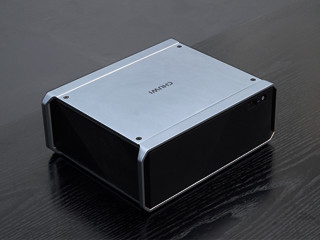
CHUWI HiGame 2018 Mini PC - Indiegogo Crowdfunding Project Preview: Kaby Lake-G at its finest?


The Kaby Lake G integrates both a Quad Core Hyper Threaded CPU as well as a mid-range VEGA graphics to provide a medium level of gaming experience all in the same socket. It’s like having an APU in but only in this case Intel’s solution uses dedicated Vega Graphics operating on the 2nd Generation of High Bandwidth Memory. As a result, systems can shrink down for both use in Desktop and Laptop Computing at the same time. In terms of Desktops, there has only been one well-known example, the Intel NUC that uses this architecture in a miniPC…. until now.

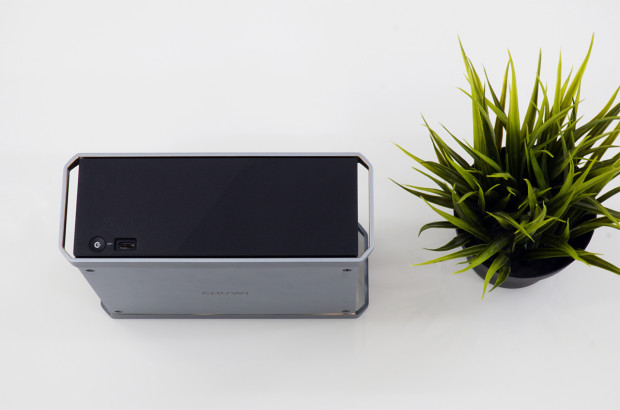
Chuwi in their wisdom decided to follow suit, but opting for a slightly larger but still compact chassis to do its thing. And the big difference in terms of appearance is how clean the front is compared to the NUC. No added lights, no fancy patterns, just sleek, clean and simple which is what I prefer on my computers compared to others.

Source: Indiegogo, Chuwi

Source: Indiegogo, Chuwi


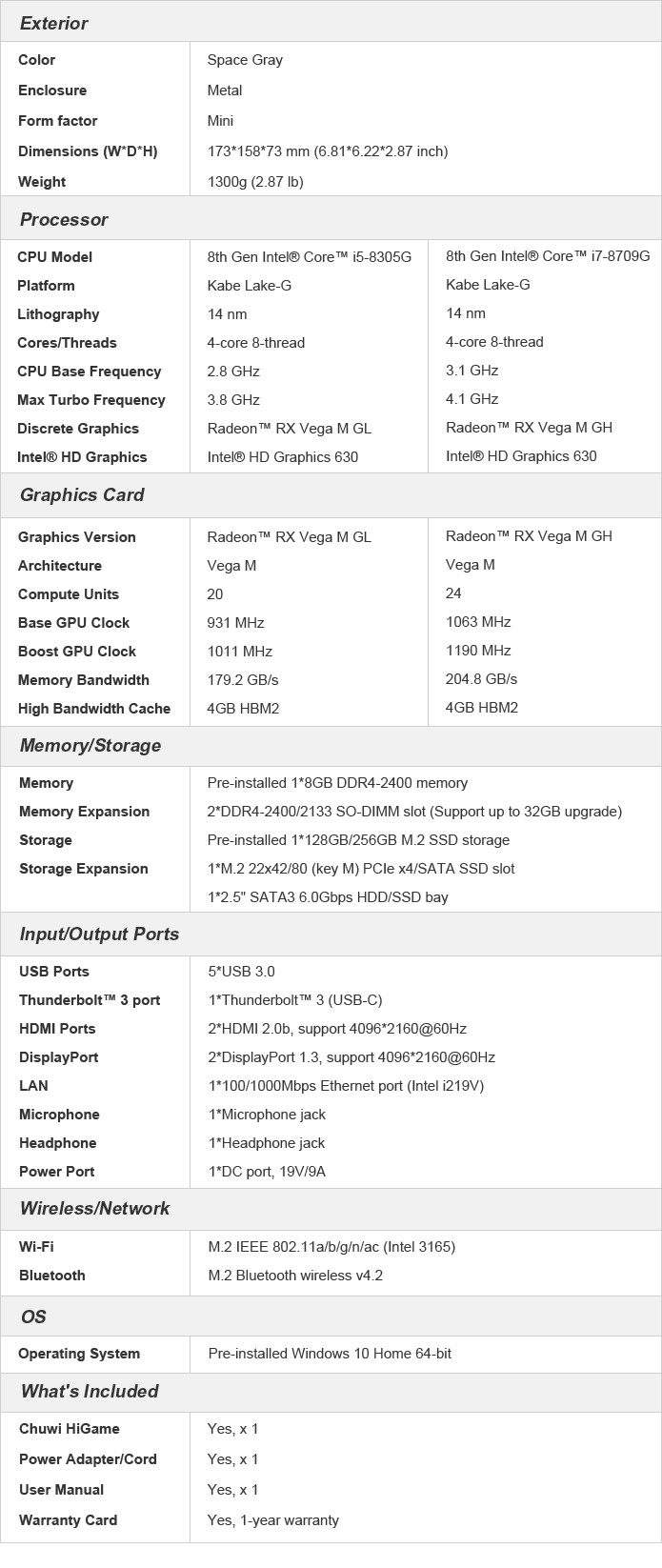
Spec Wise it has the following:

SPECS:

i5 Spec:
Intel Core i5 8305G (4C8T running at 2.8 to 3.8GHz)
8GB DDR4 RAM @ 2400MHz,
128GB M2. SSD
RX Vega M GL Graphics with 4GB HBM2 VRAM and 1280 Stream processing units.
Windows 10

i7 Spec:
Intel Core i7 8705G (4C8T running at 3.1 to 4.1Ghz)
8GB DDR4 RAM @ @2400MHz
256GB M2. SSD
RX Vega M GH Graphics with 4GB HBM2 VRAM and 1536 Stream Processing units.
Windows 10

OTHER TECH SPECS:


Source: Indiegogo

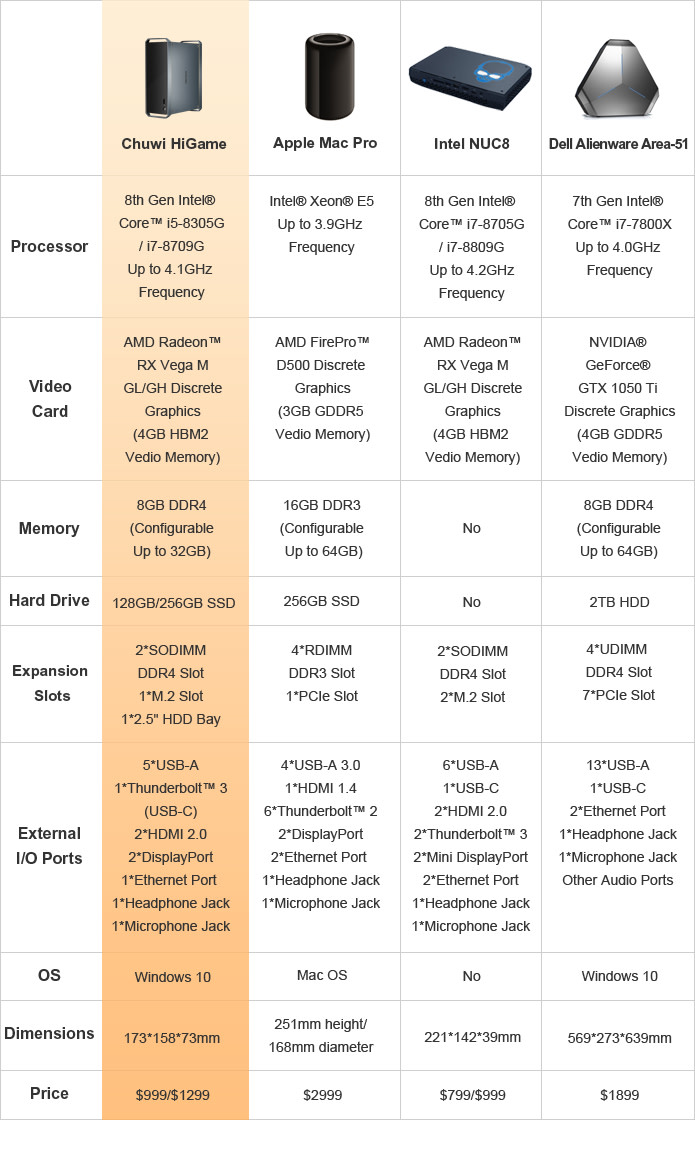
COMPARISONS WITH OTHER SFF GAMING GRADE PCs:
Source: Indiegogo.

The dimensions of the Chuwi Hi Game mini PC makes it thicker but is a good 2 inches shorter. Although the volume is significantly more once you add up, the weight of the system is actually just about the same as the NUC. That said, it remains to be seen as to whether the volume will play apart in the system's thermals and acoustics and overclocking capabilities if any.

The great thing about CHUWI’s crowdfunding project, is that all the dirty work of finding an OS, finding new parts to get it going is all done for you which will make a more pleasant out-of-the-box experience. Compared to the NUC which mostly comes in a barebones unit. You should be able to upgrade in the future but this'll enough to get you started and 8GB of DDR4 on a single stick is plenty for general computing and you can always double that later on.

Also what this mini PC has compared to the NUC, by only making it slightly thicker, allows space for a 2.5” Bay. Supposedly you'll have that flexibility of installing any kind of 2.5” SATA or nVMe SSD or Hard Drive should you wish, since they are more easily available and cheaper than M.2 stuff.

As for the mini PC’s use, the relatively powerful i5 8305G or the i7 8705G should have enough power to handle some medium to heavy video gaming while also can handle some heavy editing. And take the 8305G for instance, apart the Vega GPU and a higher 65W TDP, the i5 8305G is otherwise identical to the i7 7700HQ while the 8705G resembles the 7920HQ. So if you've used the regular Kaby Lake version of these chips you should be instantly familiar with their performance.

As for upgrades are concerned, there are quite bit of options. However to upgrade the GPU needs the CPU to be upgraded that has that chip and if there are I feel it’ll be difficult to source and difficult to upgrade. However the Thunderbolt 3 port that supports eGPU alleviates this problem a bit. Although more expensive to do so than miniPCI eGPU, it’s still a lot better than the latter function in terms of performance and memory bandwidth. So having a Thunderbolt 3 is always nice to have.

Now with that said, I’m not writing to say which one is better just yet, because the NUC and the Chuwi HiGame have their own strengths. The NUC is a slimmer unit with more I/O ports and lower weight and higher portability but less flexibility in terms of internal storage and a messier appearance. But as far as CPU architecture is concerned, it has proven as CPUs mature, systems get smaller, faster and more efficient for their volume.

First Impressions Bottomline:

PROS: Lightweight, Versatile I/O, Cleaner front than the NUC, dirty work for setup done. Competitive Pricing.
CONS: Not as compact as the NUC, less I/O, less M.2 Slots.

Currently it is in its Prototype Stage and more adjustments might be made at the time of this writing. Any case, I'll bring the review out once it arrives for testing. It's currently available for Backing for 899 for the i5 Version, and 1099 for the i7 Version. The secret Perk allows for a further 100 dollars off for both systems.

BACK IT HERE:
https://www.indiegogo.com/projects/higame-pc-mini-workstation-for-gamers-creators/x/18860519

Actual Review preview:

I will be using the i5 8305G version once that arrives So look out for the review! It'll pit against the following systems as it's what I have. This is gonna be interesting because it's more to find out how far we've come in terms of CPU efficiency over the years.

Gigabyte P27Gv2 - To compare CPU generation performance Since the Core i7 4810MQ has identical clocks and Core speeds and GPU performance difference.
My DIY Dell Precision T3500 - To Compare CPU Performance and the GTX 1060 3GB.

And the following system in terms of dimensions:
Alienware Alpha with a Core i3 4170T.

What I'll test is how easy it is to upgrade in General too, especially the 2.5" Drive because I pilfered a 500GB Hard drive out of my Alienware Alpha after swapping it out for a spare 128GB SSD as the HDD is so slow as a boot drive. The 500GB is the only one I have in spare, but I will get a faster storage drive in the future like a 256 or 480GB SSD or a 1TB 7200rpm HDD or SSHD. 

Tuesday, 20 February 2018

Project: Maintenance and conversion of a Clevo W110ER Laptop to a fixed gaming / main Computer

I intend to have some use for the Laptop, I needed to do some maintenance first:

For a while there has been a few problems with it. And for a long time, the laptop has some screws and joint problems in there. But I'm not concerned over the aesthetics of it because I'm more concerned of the performance of the laptop was not up to par.

Overwatch and Fortnite simply crashed. Diablo 3 ran slow and even games like CS:GO was a slideshow fest at a few SECONDS per FRAME, not Frames per second. My guess was that the Aftershock X11 / Clevo's thermal paste had probably dried and the GPU simply was probably on its last legs. It had IC Diamond in it and I'm having a heck of time removing it. But it has to be done as it's completely hardened and dried.

Maintenance of my Clevo W110ER
Grease mostly removed


So my solution for this one is this, Thermal Grizzly's Kryonaut. That solved most of my heat issues I'd may have with this Netbook.

And while I was at it, a thought came up saying.... why don't I convert the mini PCI-E slot that is being occupied Wireless WIFI Adapter to an External GPU? That way I can draw a lot of the heat away from the internal GT 650M it had and just leave that to the CPU which even 5 years later still kicks serious ass today. And I've a few components that I can use and further make it into a desktop conversion.

Components added to Conversion

USB Wireless Adapter
GDC Beast 8.0 (The Highlight of this project)
Corsair RM1000
External Peripherals
Assortment of GPUs to test (Primary Gaming will be a GTX 970)
1440p Monitor (advisable to have an external one)

The Build

The reason I prefer to go with nVidia Cards because of their driver support and it'll be less of a conflict and AMD Crimson drivers are normally like a few months late to even worse a year late to the party. In general, nVidia Drivers and cards are just better in almost every way in terms of power and noise and efficiency.

A GTX 970 will be the primary driver after the tests.

But let's get to the build, shall we?

The connections are pretty straightforward with plugging the cables to a Power Supply and linking with the provided ones to the GPU. Having a modular PSU would be great because it'll be a lot less messy and unsightly. But generally any ATX PSU will be fine.

Disabling the on-board VGA was a little finicky because there was no function on the BIOS to disable the GT 650M. But upon reading a tutorial to disable internal PCI-E lanes that power your dedicated GPU, that did switch off the GT 650M and the eGPU is ready to be installed which of course includes the usual install of the drivers too.

But that said, I did test that with an R9 290 as shown in the following photos and it works fine too after installing its Crimson Driver. This I finally got around to testing 2 years after I received it free as a gift from an NUS lecturer. It was his R9 290 before his PC died and I ran a FF XV Benchmark merely to test that his old baby checks out. At the same time I reapplied Thermal Grizzly Kryonaut on it... I had to, cause' I mean seriously, when I opened Dr Matt's Card, there was hardly ANY grease in it no wonder it was always throttling.


Repasting (Above) and testing Dr Matthew's R9 290 on the GDC Beast eGPU Dock (below).
Works with no problem.

Also I know the Corsair RM1000 was many times overkill to no end, but the whole rig remained cool and quiet and the PSU was hardly emitting any heat even when the GTX 970 is fully loaded as well as less unsightly cables to handle. So that turned out working pretty well.


First Impressions
The difference after going full desktop GPU was night and day. It's good to go for some really nice gaming even if it's operating on a 1x PCI-e Gen 2.0 which reduces some performance. I don't mind the drawbacks of operating in such narrow PCI-E buses so long it does what it needs to do. Click on the Link or the YouTube Boxes to watch the videos for the various gameplay tests.

1. Final Fantasy XV Benchmark: 1080p Lite Settings.


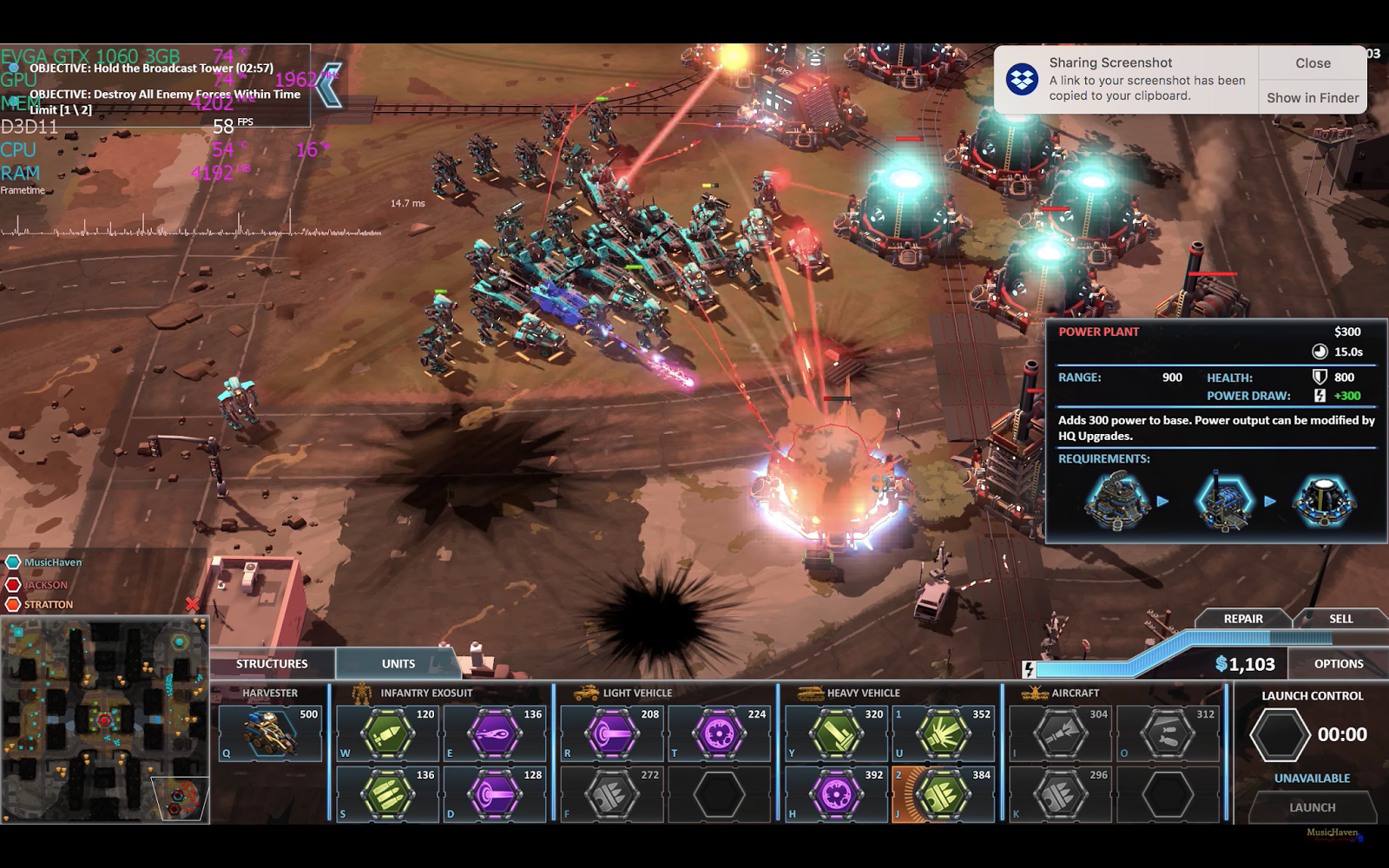
2. Forged Battalion

1440p with the GTX 970 eGPU works nicely with some of the lighter titles like Forged battalion. Then again it's a super light title, so let's toss it to the deeper end of benchmarks.

https://www.youtube.com/watch?v=3zjbGTLlMhQ

3. Battlefield 1

Battlefield 1 was playable, though not super smooth. Partly because I hadn't fully downloaded the game and just dived straight in. The difference between 1080p Ultra and 1440p Ultra in terms of fps isn't particularly huge, definitely a PCI-e Bus limitation somewhere.

https://www.youtube.com/watch?v=8zqCwls_6W4


4. 3DMark Firestrike
8900 Score on 3DMark. I had a 10,500 on a single GTX 970 and an i7 2600K overclocked. But still, nice boost

5. Doom 2016

This title, actually, surprised me a lot, not only working at all but performing very well across 1440p at Maximum settings.

https://www.youtube.com/watch?v=xrREGRQzaF8

6. Crysis 3

Testing.... TBA.


Conclusion

This was a fun project and it has been working beautifully for the week I've been using it. Sure, the mini PCI-E 1x limits performance and bandwidth but I love it so far and that has opened a new path for GPU upgrades in the future. What will be interesting to find out later is how much more of a Graphics horsepower we can squeeze in there can give us good benefits till the 1x Bus becomes a bottleneck and will not benefit us any further. But for now, stay tuned as this article will constantly be updated.

You can purchase the GDC Beast v8.0 eGPU Dock here:

Banggood
https://www.banggood.com/Mini-PCI-E-Version-V8_0-EXP-GDC-Beast-Laptop-External-Independent-Video-Card-Dock-p-1011222.html?cur_warehouse=CN

Gearbest:
https://www.gearbest.com/laptop-accessories/pp_229101.html

Aliexpress:
https://www.aliexpress.com/item/EXP-GDC-Laptop-External-Independent-Video-Card-Dock-with-PCI-E-Interface-Black/32456172794.html

Lazada Singapore
https://www.lazada.sg/products/v80-exp-gdc-laptop-external-independent-video-card-dock-mini-pci-e-for-beast-intl-i102419952.html?spm=a2o42.order_details.details_title.1.56b646929D99F3

Tuesday, 23 January 2018

Forged Battalion - Brings back good ol' C & C Generals Nostalgia (Early Access)

Overview

Forged Battalion is an upcoming 2018 RTS title being developed by Petroglyph Games and published by TEAM 17. Petroglyph games is a private developer actually formed from the ashes and employees from what used to be Westwood, who developed the Red Alert series which has been my favorite RTS series to date. The dissolution of Westwood into EA saw a huge layoff of employees and it led to some founding Petroglyph Games which also includes the composer of Forged Battalion's Music Klepacki. TEAM 17 is the publisher that published the very successful Worms franchise of games. Much more doesn't need to be said about TEAM 17, c'mon, they did Worms.

Design your own faction, create your own units from the ground up, build a base, and wipe the enemy, pretty much the norm for RTS these days. By winning battles both in the Campaign as well as Ranked and Unranked matches, you will earn research points to unlock weapons and parts from the Tech Tree for your faction.

Unit Builder:

The commander has the option to create his own infantry and vehicles using parts and weapons researched from the tech tree. Each weapon or component modifying the base chassis will alter the cost of the unit. And great that they tell you the general effectiveness of each weapon type against various unit types (Infantry, Light, Armored, Aircraft, turrets, Buildings respectively) A Maximum of 4 units can be chosen to be built by one type of factory. Essentially you can customise and build up your own faction or army type depending on your needs.

Tech Tree:

As you win various battles in the game, whether campaign, offline skirmish or PvP ranked / unranked, you'll earn research points based on difficulty for your faction. So basically you can skirmish everytime to earn all the points you need. Currently 3 tiers are available and as to the 4th one, I guess it'll be unlocked in the full release of the game.

The Game:


 The game is very similar to C and C generals in terms of its look and feel as well as many of the Command and Conquer series and the Dawn Of War Series of RTS games. So you'll feel at home. Of course, since the people who are developing Forged Battalion, developed Red Alert 2 and Generals. So your role, most of the time is to take out your enemy using the units you made via the Faction Creator. You can capture outposts with Infantry as soon as your Comm center is built, around a similar manner as Company of Heroes and Dawn of War, which is to move infantry next to the outpost and hold till it's captured. 


Performance:

Performance of this game is fairly light to run. And because it looks like it, I went straight to Maximum Settings as shown in the test videos below within my devices' native resolutions. 1440p for the GTX 1060 Rig, and 1080p for the GTX 860M Rig.

Test Device 1: Desktop Test Bench
Xeon X5670 6C12T
16GB DDR3 RAM
250GB Samsung EVO 850
3GB GTX 1060 EVGA ACX Gaming 'Mini' - Overclocked


Test Device 2: GTX 860M / GTX 750 Ti Bench
Core i7 4810MQ
16GB DDR3 SODIM RAM
120GB mSATA SSD
2GB GTX 860M, Slight overclocked

1080p Maximum Settings


Low End GPU Test: 
Aftershock X11 / Clevo W110ER
Core i7 3630QM
8GB RAM
GT 650M
Windows 7 Home Premium.


Although this game is relatively light on GPU power, more CPU power is definitely needed as your army grows larger as you'll very likely expect. But for most of the time, playable framerates, a GTX 860M that I had will be fine and a GTX 1060 3GB will hardly break a sweat at maximum settings at 1440p 60fps. However, old GPUs like the GT 650M can only settle at 768p at low details. Probably due to newer drivers don't really support Kepler based GPUs anymore.

More devices will be added later, as soon as I have the time to bench them.


Conclusion

Forged Battalion really brings back some of the old concepts and keep the spirit of Command And Conquer Generals alive. And being fairly light to run, it will be easy on the hardware. Since it's just went early access, the game is currently under promotional price of just over 10 USD which is pretty sweet. And considering this early stages of the game development, it is quite well optimised. And considering the price at 17 USD, and minus 15% from a promo deal, it may be worth taking a look, especially if you like real-time strategies like Dawn of War and Red Alert.

Monday, 16 October 2017

Intel Kaby Lake Refresh: The up gunned CPU Refresh... More cores = more performance?

Intel has leaked even more specs and details for the new line of CPUs that are set to appear at this final quarter of 2017 as well as a couple of confirmed Laptop ULV (Ultra Low Voltage) CPUs to the market.

Desktop

Starting with the Desktop CPUs. We'll definitely expect a HyperThreaded CPU in this line as its consumer flagship. As far as leaks go, it'll be a 6 Core CPU, with 12 threads. This will place it pretty much along the lines of examples like the X99 LGA 2011 based CPUs like the i7 5820K, and its successors the i7 6800K and 6850K SKUs. With the K suffix, we should expect nice gains from overclocks. Personally as far as the flagship X Series CPUs go, I judge the 6800 series as running real hot and requires some High End coolers to handle this TDP. But because of the efficiency of Kaby Lake which we should expect abit more for this one, I really hope this will become less of an issue.

But down the mainstream and cheaper line, things start to get plenty interesting. The i5s should get a Hex Core non-Hyperthreaded which is a really heavy boost compared to a Quad Core. It'll probably give performance that is almost as comparable as the old i7s. For i3s details are even juicier. The 8350K is specced as a Quad Core. As far as rumours about HyperThreading go, it might have it, it might not. Regardless of the case, I actually really am intrigued and interested on finding out its performance and heck, I wouldn't even mind if it doesn't have hyper threading. If 4 cores on an i3 remains true, that would be really nice and can bash the Ryzen 3 and 5s. All eyes on the i3s at least because this is gonna be interesting if even a non-Hyperthreaded Quad Core delivers the goods expected of it.

PROS: Big Competition on the budget side. True 4 core and 6 Core CPUs
CONS: Suspect high price.

Laptop

We have confirmed specs of their new ULV Laptop SKUs which just recently launched.

Core i7 8650U (4C8T, 6MB Cache)
Core i7 8550U (4C8T, 6MB Cache)
Core i5 8350U (4C8T, 4MB Cache)
Core i5 8250U (4C8T, 4MB Cache)

Compared to all the other Ultra Low Voltage Laptop chips prior to this, these two chips remains as true Quad Cores with Hyper Threading as we usually regard i7s as. The last generation was stuck with 2 Cores on the i7 7600U and 7500U so should be a big upgrade. Sure, base clock speeds will be lower in turn, but I reckon their Multi Threaded performance will definitely thrash some of the Quad Core i5 that popped up since Skylake. The 8650 and 8550 are specced at 15 Watts but can boost to 25 Watts TDP if required. The 8650U has a 1.9 GHz base to 4.2 GHz Turbo for a single core, which should give more than adequate Single threaded performance and the 8550U at 1.8 to 4.0. Also the other big difference with this Kaby Refresh, is doubling the Cache from 4MB to 8MB.

That should effectively increase the performance of ULV i7s by as much as 40-50% over their predecessors, especially their Multi-Threaded performance. Sure it won't be the regular 35W TDP cousins, but compare that with say the Quad Core i5 6300HQ, 6440HQ, 7300HQ and 7440HQ, for less TDP and with more Cores, should match the i5s at a respective level. It remains to be seen about the true performance of these Quad Cores, especially the i5 8350U and 8250U when it comes out.

The improvements don't stop there, the i5 Refresh do carry this Quad Core WITH hyperthreading trend. And it runs pretty well. Notebookcheck (German Region) did a review of the Acer Swift 3 that comes with an i5 8250U, and it matches up well with the i5 7300HQ, edging out the latter in both the Single and the Multi-Threaded scores on Cinebench.

Link:
https://www.notebookcheck.com/Test-Acer-Swift-3-SF315-8250U-MX150-FHD-Laptop.250948.0.html


Friday, 18 August 2017

SMRT and the MRT Breakdowns: Get your act together, this is 2017.

I refer to the following article in light of the recent MRT incidents and stuff that I really should write in this blog of Paul's Tech Insights.

http://www.jeraldinephneah.com/singapore-mrt-breakdown/

It's not Computer Related, but in a way still Tech because of the systems involved in this government operated transport system. This is such a well written article questioning the reliability of the SMRT transport system. What the writer wrote got it absolutely spot-on.

 For myself, the plus side is I like taking the train, I like the system itself; I think it's pretty damn awesome but never like the breakdowns and the recent frequencies that it does.

After a few years of constant breakdowns and disruptions, it is time for SMRT to have a huge reality check. After all the price hikes and us commuters have to fork, we expect any bugs to be mostly ironed out, reliability back to where it should be. There's no excuse to leave themselves in denial of all this.

 For many, especially for #2 point Jeraldine highlighted, the MRT just can't afford to break down on people that doesn't have any other transport option whether the bus stop is so ulu, or change here change there on the bus....The public is just so dependant and needs to rely on it to run safely and fuss free as much as possible.

C'mon, it's 2017 now, and the system is well over 35 years old. And so many incidents of breakdowns and by now surely sensible protocols should have been thought up by now to avoid breakdown issues or accident issues.

This morning's breakdown was significant because it was taking place on an Exam day. The thing is MOE took SO LONG to post their reassurances that no penalties will be taken against them. And SMRT took SO LONG to deploy measures and stuff. Clearly, never learning from their past breakdowns and there's no more excuses anymore that just leave a bad taste in everybody's mouths. And from all the photos whenever a train breaks, SMRT's Crowd Control SUCKS, tell ya plain.

You know whenever you play for a concert or gig and it acts like a rehearsal to make the next one better. Every breakdown is a rehearsal for the following but not only it didn't improve, it just got worse.

But what about those without Facebook I wonder?
And what about the students too man? Entering the state of increasing Kanchiong-ness if you will when, the train breaks on a pivotal date. Who would want to take the exam in a mental state like this?
And what about logistics for both invigilators and students alike? 

Think about that. Any responsibilities from their affected results lies completely with SMRT because MOE within their capacity to be fair, cannot do anything about transport issues, cause' they ain't the root cause of the disruption chain.

No student should ever have to go through such an ordeal.

Speaking of accidents, look at the recent LRT incident where a man, I know drunk but then still..., got ran over not once, but twice. Whatever safety measures there is pretty much non-existent and no plans down the pipeline to make this line safer for commuters. Ridiculous! Furthermore, Not long ago, two workers got slammed by the MRT earlier. I don't see why in 2017, things like this still happen.

SMRT, you better get your act together. I wanna emphasise again, this is 2017, we should look towards much higher reliability in terms of way less or even no more breakdowns especially in the thick of moments. And less accidents, please. We also don't want any waste of life caused by safety lapses, do we?

Friday, 2 June 2017

Some help for trading (Singapore Only!) towards the ITX build that I held off for so long.

Heya all, I need some help with trading stuff or buy these parts from me. For a long time I've been holding off my ITX build for so long because I just don't have the budget. Now that I do, but also need to do a complete cleanup of so many parts here and there that now I need to do some consolidating here.

The ITX build although it was working under Ben, the Power Supply wasn't really doing much good till it died. Changing the Power Supply would do wonders there. So here is the parts that are certainly working.

MSI Z87I Board
Coolermaster Elite 120
Drives
RAM

And here is all this crap that I'm trying to sell or trade.
Look at all this stuff.


Quite a whole butt load of parts that I'm trying to sell for updated parts, if you guys can help me that'll be great!

Here's what I have there:

Graphics Cards
GTX 970: MSI Armor Edition
GTX 970: Palit Vanilla Edition.
Quadro 600
Radeon R9 290
Radeon 6950 (For parts, may not be working)
Radeon 5850 (Still works quite well there!)

CPUs:
Intel Core i7 2600K - LGA1155 4C8T
Intel Xeon W3565 - LGA1366 4C8T
Intel Core i3 4330 - LGA 1150 2C4T
Intel Core i3 2100 - LGA 1155 2C4T
Pentium G3258 - LGA1150 2C2T

Sounds quite a lot right?

What I am looking for are the following:
Core i7 4790K with a decent Low Profile Cooler
16GB in 2x8 if possible
GTX 1070.
650W PSU

So yup, some help to get my ITX build up and running would be great!